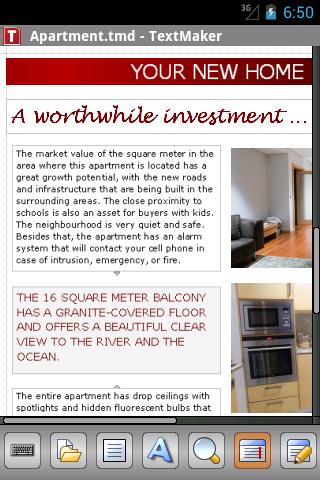
TextMaker Mobile is the only word processor for Android that lets you open, edit, and save all your Microsoft Word documents while preserving all formatting and content. It displays your documents exactly like they look on your PC - even using the correct fonts if you copy them to your you phone.
Features:
- Edit and save all .doc, .docx, and .docm files from Microsoft Word 6.0 up to 2010 seamlessly, without losing formatting or content<
- Also opens and saves password-protected Microsoft Word files.
- PDF export directly from within the app
- On-the-fly spell checking for English (US+UK), German, Swiss German, French, Italian, Spanish, Portuguese, Norwegian, Swedish, Danish, Dutch
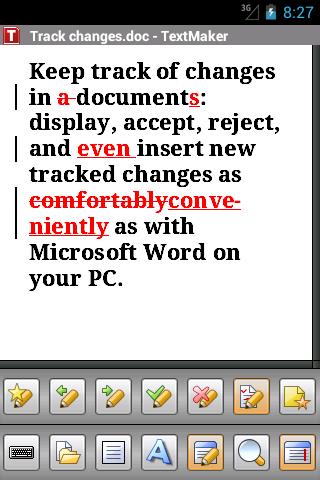
- Work with tracked changes and comments like you do in Microsoft Word on your PC.
- in Google Drive, Dropbox, and directly from within the app.
- Pictures may be inserted from image files, from the built-in camera, and the photo gallery.
- A huge range of character formatting options, including bold, italic, underlined, font and size, text and background color, subscript and superscript, small caps, and all caps
- Flexible paragraph formatting: left and right indent, first-line indent, paragraph alignment,, space above/below paragraph, tabs
- Apply Paragraph styles
- Lists with bullets and automatic numbering
- Display any TrueType or OpenType font
- Automatic hyphenation in 33 languages
- 100-level undo and redo
- View documents in print view or draft mode
- Bookmarks
- Document statistics (keystrokes, characters, words, sentences, etc.)
- by e-mail directly from TextMaker Mobile in any of its file formats (PDF, DOC, DOCX, HTML, etc.)
- Menus and dialogs switchable between English, German, French, Italian, Spanish, Portuguese, Dutch, Japanese, Chinese, Russian, Hungarian, Bulgarian, Greek, and Turkish
TextMaker Mobile is the only word processor for Android that truly deserves its name. Check it out now, you will be amazed by its capabilities, its spotless compatibility with Microsoft Word, and its friendly
Imagine this: You can start a document in Microsoft Word on your PC, edit it using TextMaker Mobile, then finish it with Microsoft Word. Everything stays intact, no formatting is lost. No other Android word processor does this!
Supported file formats: TextMaker (TMD, TMV), Microsoft Word (DOC, DOT, DOCX, DOTX, DOCM, DOTM), RTF, HTML, OpenDocument / OpenOffice / LibreOffice (ODT, OTT, SXW), Pocket Word (PSW, PWD), plain text in many encodings
What's in this version : (Updated : Oct 21, 2012)
- Load and save documents in google drive
- Improved handling of Dropbox and Evernote
- DOCX files are now opened up to four times as fast
- Paragraph styles can be viewed and applied.
Required Android O/S : 2.2+
Download apk:http://www.datafilehost.com/download-de77f554.html
or scan the qr code