Showing posts with label office. Show all posts

Tuesday, 19 February 2013

OfficeSuite Pro 7 v7.0.1166 APK


Intuitive and Intelligent Design:

  • OfficeSuite 7 comes with new intuitive design and user experience allowing quick and intuitive workflow while you manage your files or create and modify documents.

  • New side bar gives instant access to local and cloud stored files.

  • Two-finger zoom, multi-touch support, context toolbars and popup menus make your work with OfficeSuite quick and fun.


OfficeSuite Extensions:

  • QuickSpell – fully integrated with OfficeSuite Pro QuickSpell will help you dramatically improve your typing accuracy.

  • Font Pack – allows you to use Microsoft most used fonts in OfficeSuite text documents.

  • Note that OfficeSuite Extensions are sold separately. Purchasing any of the extensions is optional.


Compatible with Sony Ericsson LiveDock™ Multimedia station.

What's in this version : (Updated : Feb 15, 2013)

  • New and improved UI

  • Sidebar navigation in File Browser

  • Templates

  • Extended Cloud support - now compatible with Microsoft SkyDrive. Google Drive support has been improved, by adding folder support, thus allowing for optimized document view

  • Styles in text documents

  • Table designs

  • Formulas (display only)

  • Format painter

  • Improved selection of parameters in functions

  • Animations

  • A new PDF engine using library from Adobe

  • Find/Find Next in PDF


Required Android O/S : 1.6+


OR SCAN THE QR CODE


Monday, 26 November 2012

OfficeSuite Pro 6 + (PDF & HD) v6.5.1010 APK


OfficeSuite 6 New Features:

  • Completely redesigned and improved user interface and experience

  • Recent Files and My documents shortcuts in the File Browser allowing more efficient access to documents

  • Filters in the file browser to help you quickly access files from selected format

  • Intuitive toolbars added in the File Browser, the document and spreadsheet modules

  • Two pane user interface on Android 3.0 Honeycomb devices

  • Support for EML and RTF file formats

  • Direct Save of text documents in Google Docs

  • Email reader module allowing you to work with EML Outlook files


OfficeSuite is the selected office productivity application by a number of manufacturers and has been preloaded on over 20 million devices worldwide by manufacturers as Sony Ericsson, Alcatel, FoxConn, Pandigital, Olivetti and many others.
OfficeSuite consists of several software modules that share the same look and feel, and allow you to view, create and modify office document on the go:

  • File browser

  • Text document module

  • Spreadsheet module

  • Presentation module

  • PDF Reader

  • Email reader


What's in this version : (Updated : Oct 22, 2012)

  • Optimized 7" tablets UI

  • 6.5 New Features:

  • Print - print documents with Google Cloud Print or previously installed third party printer

  • Convert your text documents to PDF files

  • Spell-check (based on Google ICS spell-check)

  • New supported formats - opening of XLSM, PPTM, PPSM and DOCM formats

  • Thumbnail preview in Slideshow mode

  • Animated Slideshow support

  • Embedded images & charts (in Excel module)

  • Compatible with Microsoft SkyDrive

  • WiFi Direct support


Required Android O/S : 1.6+


or scan the qr code


Friday, 2 November 2012

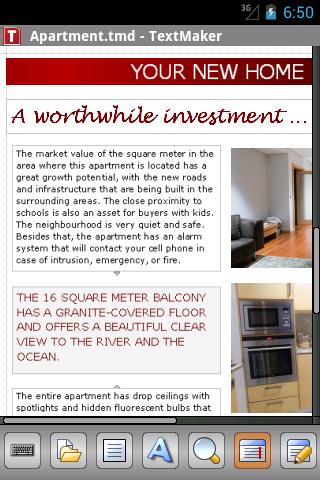
Office 2012: TextMaker Mobile v1.0 APK


TextMaker Mobile is the only word processor for Android that lets you open, edit, and save all your Microsoft Word documents while preserving all formatting and content. It displays your documents exactly like they look on your PC - even using the correct fonts if you copy them to your you phone.
Features:

  • Edit and save all .doc, .docx, and .docm files from Microsoft Word 6.0 up to 2010 seamlessly, without losing formatting or content<

  • Also opens and saves password-protected Microsoft Word files.

  • PDF export directly from within the app

  • On-the-fly spell checking for English (US+UK), German, Swiss German, French, Italian, Spanish, Portuguese, Norwegian, Swedish, Danish, Dutch

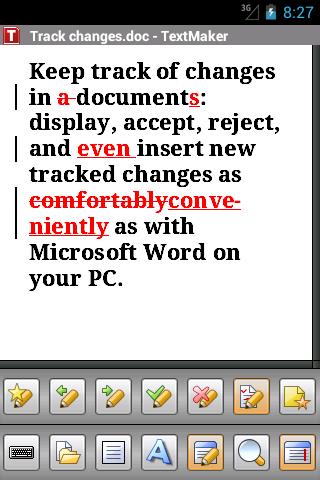
  • Work with tracked changes and comments like you do in Microsoft Word on your PC.

  •  in Google Drive, Dropbox, and directly from within the app.


  • Pictures may be inserted from image files, from the built-in camera, and the photo gallery.

  • A huge range of character formatting options, including bold, italic, underlined, font and size, text and background color, subscript and superscript, small caps, and all caps

  • Flexible paragraph formatting: left and right indent, first-line indent, paragraph alignment,, space above/below paragraph, tabs

  • Apply Paragraph styles

  • Lists with bullets and automatic numbering

  • Display any TrueType or OpenType font

  • Automatic hyphenation in 33 languages

  • 100-level undo and redo

  • View documents in print view or draft mode

  • Bookmarks

  • Document statistics (keystrokes, characters, words, sentences, etc.)

  •   by e-mail directly from TextMaker Mobile in any of its file formats (PDF, DOC, DOCX, HTML, etc.)

  • Menus and dialogs switchable between English, German, French, Italian, Spanish, Portuguese, Dutch, Japanese, Chinese, Russian, Hungarian, Bulgarian, Greek, and Turkish


TextMaker Mobile is the only word processor for Android that truly deserves its name. Check it out now, you will be amazed by its capabilities, its spotless compatibility with Microsoft Word, and its friendly
Imagine this: You can start a document in Microsoft Word on your PC, edit it using TextMaker Mobile, then finish it with Microsoft Word. Everything stays intact, no formatting is lost. No other Android word processor does this!
Supported file formats: TextMaker (TMD, TMV), Microsoft Word (DOC, DOT, DOCX, DOTX, DOCM, DOTM), RTF, HTML, OpenDocument / OpenOffice / LibreOffice (ODT, OTT, SXW), Pocket Word (PSW, PWD), plain text in many encodings
What's in this version : (Updated : Oct 21, 2012)


  • Load and save documents in google drive

  • Improved handling of Dropbox and Evernote

  • DOCX files are now opened up to four times as fast

  • Paragraph styles can be viewed and applied.


Required Android O/S : 2.2+


or scan the qr code

Related Posts Plugin for WordPress, Blogger...