Showing posts with label control. Show all posts

Monday, 17 December 2012

RDM+ Remote Desktop v2.1.1 Apk


Access and control your PC remotely right from your mobile device with RDM+ Remote Desktop app.
Don't be tied to your home or o*ffice computer. Send and receive e-mails, edit documents, surf the web, manage files and do hundred other things that you usually do on your desktop, even when you are on a business trip or stuck in a traffic jam.
Simply install mobile application on your Android and RDM+ Desktop on the remote computer and RDM+ is ready to use. No need to adjust any firewall or router settings.

"In a short time, your desktop's screen will be displayed on your Android phone and you can pretty much do whatever it is that you want to do."
ANDROID-APPS.COM

Why RDM+ is really a must-have tool for you?
- Sometimes you need to check or edit your documents, and your computer is nowhere near you. Do it easily using familiar mouse commands, standard WinOS and Mac hotkeys. Pinch to zoom in/zoom out.
- Copy, rename, delete files, send them from PC to your Android and vice versa with built-in file manager.
- System Manager: see how your desktop is doing while you are away from home. Check and change system settings, execute command line commands, control running processes.
- Works via both WiFi and carrier data network.
- Ultimate security level makes your data exchange absolutely safe. Master password protects list of your computers, so even if your device is stolen or lost, noone could access your information.

DOWNLOAD APK:http://www.datafilehost.com/download-23cdc095.html

OR SCAN THE QR CODE

Monday, 19 November 2012

EVA - Virtual Assistant v2.55 APK


Who should use EVA? If you are looking for an application that provides hands-free operation of your phone to open apps, read and reply to text messages and email, schedule calendar events and many more functions that you can perform using just your voice then EVA is right for you.

If you are just looking for an electronic friend to chat with then please go with one of the Siri clones. On the other hand if you want a real virtual assistant that has useful functions that will make your life easier then please give EVA a try.
EVA has all the functions you'd expect your assistant to perform plus some that you probably never new were possible. Here is a list of some of the functions that you wont find in most of the competition:

  • Home Automation with INSTEON. Turn on the lights and appliances, open the garage door and a whole lot more, all with voice commands or scheduled or based on your location.

  • Location based reminders. Remind you to do something based on your location.

  • Location based actions. Perform any function that EVA can do based on your current location. Have EVA automatically text your wife when you leave the office.

  • Time based actions. Perform any function that EVA can do on a set day and time

  • In car mode including wake up phrase

  • Custom voice shortcuts to your phone applications. Give your apps any name you want and open them using that name.

  • Voice bookmarks to your favorite web sites. Give your bookmarks any name you want and open them using that name.

  • Activate just by shaking your phone

  • Works with all Bluetooth Headsets


What's in this version : (Updated : Nov 18, 2012)

  • Video Channel: http://www.youtube.com/user/Ausiguy1/videos

  • RESCHED/CANCEL EVENTS

  • REMOTE CONTROL (VIDEO)

  • GOOGLE TALK (VIDEO)

  • WIRED HEADSET PROFILE WITH AUTO ACTIVATION

  • PET NAMES, TIME FORMATS

  • NFC TAGS (VIDEO)

  • NOW READS YOUR TWITTER FEED (VIDEO)

  • SELECT CONTACT DEFAULT EMAIL AND NUMBERS

  • NEW MESSAGING FEATURES (VIDEO)

  • INTEGRATION WITH TASKER (VIDEO)

  • HANDS-FREE READ AND REPLY TO FACEBOOK FEED (VIDEO)

  • EVERNOTE INTEGRATION

  • MICROSOFT EXCHANGE INTEGRATION

  • LOCATION BASED ACTIONS, REMINDERS


Required Android O/S : 2.2+


or scan the qr code

Tuesday, 13 November 2012

Flick Traffic v1.0 APK


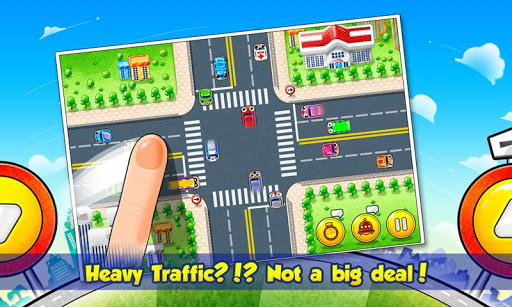
Save the cosmopolitan cities from TRAFFIC RUSH!! You can do this with your fingers.
Traffic Control is a game of managing traffic. Try to minimize the traffic on intersections, and avoid any crash. Each city has its own map and vehicles. DIFFERENT CITIES, DIFFERENT FUN!!

You can play in these various challenging and difficult maps:

  • Las Vegas (USA)

  • Beijing (China)

  • Paris (France)

  • San Francisco (USA)

  •  ToKyo(Japan)

  • New York(USA)


HOW TO PLAY:


  • Swipe your fingers to accelerate the vehicles on screen

  • Tap the vehicles to stop moving

  • Purchase items and apply on screen to take effect


FEATURES: 

  • Six different and unique maps

  • In game items that you can use to make the game more fun

  • Famous sights of the world

  • Various vehicles: car, bus, truck, bike, etc.

  • As in real life, each of the vehicles rushes with different speed and sound


Download apk:http://www11.zippyshare.com/v/69161063/file.html

or scan the qr code


Related Posts Plugin for WordPress, Blogger...